
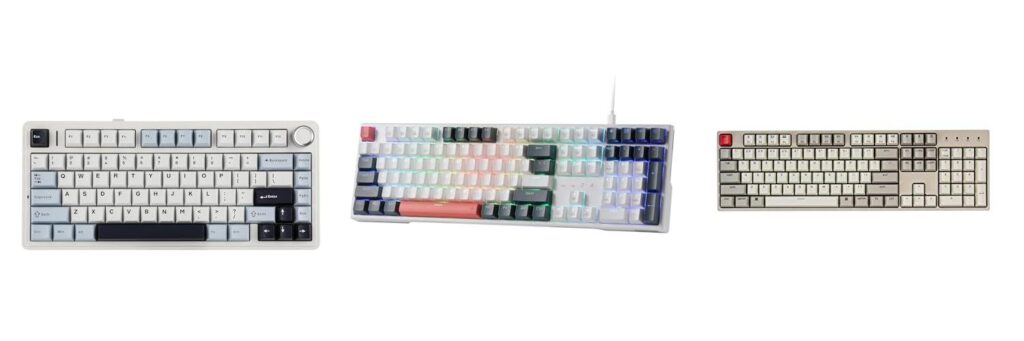
Do you love the satisfying click and feel of a mechanical keyboard? Maybe you’ve heard about them and want to try one, but the price tag seems too high. It’s true, many amazing mechanical keyboards cost a lot of money. But what if you could get that awesome typing experience without breaking the bank?
Finding a great mechanical keyboard for under $100 can feel like searching for a needle in a haystack. So many brands and types of switches exist! It’s easy to get confused and wonder if you’re really getting a good deal. You want a keyboard that feels good to type on, lasts a long time, and maybe even looks cool, all without spending a fortune.
This post is here to help! We’ll dive into the world of affordable mechanical keyboards and show you what to look for. You’ll learn how to pick the perfect one for your needs, whether you’re a gamer, a student, or just someone who enjoys typing. Get ready to discover some hidden gems that will make your typing life so much better!
Our Top 5 Mechanical Keyboard Under 100 Recommendations at a Glance
Top 5 Mechanical Keyboard Under 100 Detailed Reviews
1. EPOMAKER x Aula F75 Gasket Mechanical Keyboard

Rating: 9.4/10
The EPOMAKER x Aula F75 is a compact 75% wireless mechanical keyboard designed for both gaming and everyday use. It features a unique gasket structure for a comfortable typing feel, five layers of sound-dampening padding for a quiet experience, and a versatile three-way connectivity system. The keyboard also boasts a handy multimedia control knob and hot-swappable switches for easy customization, all wrapped in a stylish light blue finish with vibrant RGB lighting.
What We Like:
- The 75% compact layout saves desk space and is great for portability.
- The gasket structure and five-layer padding make typing feel very comfortable and quiet.
- You can connect it wirelessly via Bluetooth or 2.4GHz, or with a USB-C cable, giving you lots of options.
- The multimedia knob is super handy for adjusting volume and other settings.
- You can easily change the switches to your preference thanks to the hot-swappable design.
- The PBT keycaps are durable and look good, and the RGB lighting adds a cool touch.
- The 4000mAh battery lasts a long time, so you won’t have to charge it often.
What Could Be Improved:
- While the LEOBOG Reaper switches are good, some users might prefer different switch types not included in this specific package.
- The software for customizing RGB lighting and keybinds could be more user-friendly for beginners.
Overall, the EPOMAKER x Aula F75 is a fantastic keyboard that balances performance, comfort, and customization. It’s a solid choice for anyone looking for a premium typing and gaming experience.
2. Redragon K668 RGB Gaming Keyboard

Rating: 8.5/10
The Redragon K668 RGB Gaming Keyboard is a fantastic choice for gamers who want a customizable and feature-rich typing experience. This wired mechanical keyboard boasts 108 keys, including four extra hotkeys for added convenience. It comes with red switches that offer a quiet, linear feel, and includes sound-absorbing foam for a crisp typing sound. You also get two sets of mixed-color keycaps, allowing you to personalize your setup.
What We Like:
- You can easily swap out the red switches for almost any other type, making it super adaptable to your preferences.
- The keyboard has a full-size layout with 104 anti-ghosting keys, so you can press many keys at once without missing a beat.
- The RGB lighting is vibrant and offers many preset modes, including a cool music sync feature that makes your desk look like a disco.
- It has adjustable feet, making it comfortable to use for long gaming sessions.
- You can use the Redragon software to create your own custom lighting effects and macros for gaming or work.
- The included sound-absorbing foam keeps your typing quiet and clean-sounding.
- The extra hotkeys add practical shortcuts for everyday use.
What Could Be Improved:
- While the mixed color keycaps are a nice touch, some users might prefer a fully uniform color scheme.
- The software, while powerful, might have a slight learning curve for beginners.
This keyboard offers a lot of bang for your buck, providing excellent customization and performance for both gaming and daily tasks. It’s a solid upgrade for anyone looking to enhance their desk setup.
3. Keychron C2 Full Size Wired Mechanical Keyboard Compatible with Mac

Rating: 8.7/10
Meet the Keychron C2, a full-size wired mechanical keyboard that brings a touch of retro style to your desk. It’s built for both Mac and Windows users, offering a complete 104-key layout with a handy number pad. This keyboard is designed to make your work and play more efficient and comfortable.
What We Like:
- It has a full-size layout, which means it includes a number pad. This makes it great for work tasks that need lots of numbers.
- The keyboard is made for both Mac and Windows. It even comes with extra keycaps so you can switch them out for your specific operating system.
- It has a comfortable typing experience. The keyboard has an inclined bottom frame and adjustable feet so you can find the perfect angle.
- The Keychron Brown switch provides a satisfying tactile feel. It’s also built to last, with a lifespan of up to 50 million keystrokes.
- The retro color scheme looks really cool. It fits in just as well in a gaming setup as it does in an office.
- It uses a reliable USB Type-C wired connection with a braided cable. This ensures a steady connection.
What Could Be Improved:
- This version of the Keychron C2 does not have backlighting. This might be a downside for those who like to type in dim light.
- The Num Lock key only works with Windows. Mac users won’t be able to use this specific key.
The Keychron C2 is a solid choice for anyone wanting a reliable, comfortable, and stylish mechanical keyboard. Its retro look and user-friendly features make it a great addition to any setup.
4. Portable 60% Mechanical Gaming Keyboard

Rating: 8.7/10
Unleash your gaming potential and boost your productivity with this Portable 60% Mechanical Gaming Keyboard. Its super small size means more room for your mouse, and the detachable USB-C cable makes it easy to take on trips. Gamers who need speed will love its secure connection. Plus, you can switch it to arrow keys by pressing Fn + Spacebar, making it work even better for you.
What We Like:
- 60% Compact Design: Frees up desktop space for better mouse movement and is easy to carry.
- Linear Red Mechanical Switches: Offer fast, smooth typing with minimal resistance, perfect for gaming and quiet office work.
- Durable PBT Keycaps: Provide a clear backlight and last a long time.
- 18 LED Rainbow Backlight Effects: Customize your lighting with 5 brightness levels, speeds, and a custom mode to match your mood.
- Ergonomic Design: Stair-up keycaps and foldable kickstands provide comfort and reduce hand fatigue during long sessions.
- Full Keys Anti-ghosting: Ensures all your key presses register simultaneously, preventing errors in games.
- Strong Compatibility: Works with Windows and Mac without needing extra software.
What Could Be Improved:
- Limited Key Functions: The 60% layout means some keys are accessed through function layers, which might take some getting used to.
- No Wireless Option: It’s a wired keyboard, which might limit placement options for some users.
This keyboard is a fantastic option for gamers and anyone who needs a compact, comfortable, and stylish typing experience. It’s a great value for its features.
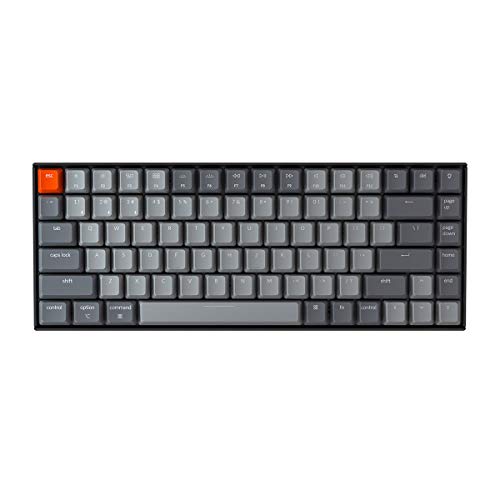
5. Keychron K2 75% Layout Bluetooth Wireless Mechanical Keyboard K Pro Brown Switch/White LED Backlit/USB C/Anti Ghosting/N-Key Rollover
Rating: 8.6/10
The Keychron K2 is a fantastic mechanical keyboard that packs a lot of features into a compact 75% layout. It has 84 keys, keeping all the important ones like arrow keys and function keys. This makes it great for both typing and gaming. It feels comfortable to use, even without a wrist rest, thanks to its slanted design.
What We Like:
- You can connect it to up to three devices at once using Bluetooth and switch between them easily.
- It works with both Mac and Windows computers, and even comes with extra keys for each system.
- The battery lasts a really long time, up to 72 hours of typing or 7 days of normal use on a single charge.
- The K Pro Brown switches offer a satisfying click and feel, and they are built to last.
- The white LED backlight is a nice touch for typing in dim light.
- It supports N-key rollover (NKRO) when wired, meaning it can register many key presses at once.
What Could Be Improved:
- While wireless, it only supports 6-key rollover, which might be a limitation for very fast-paced gaming.
- The white LED backlight is nice, but it only has a static mode, so you can’t change the colors or patterns.
Overall, the Keychron K2 is a versatile and well-built keyboard that offers a great typing experience for various users. It’s a solid choice for anyone looking for a compact mechanical keyboard that works well with multiple devices.
Your Guide to the Best Mechanical Keyboard Under $100
Looking for a mechanical keyboard that feels great and doesn’t break the bank? You’ve come to the right place! Mechanical keyboards offer a different typing experience than the squishy, mushy keys on most laptops. They use individual mechanical switches under each keycap. This guide will help you find a fantastic mechanical keyboard for under $100.
1. Key Features to Look For
Switch Type
This is the most important part! Mechanical switches feel and sound different. Common types include:
- Red Switches: Smooth and quiet, good for gaming and typing.
- Brown Switches: A little bump you feel when the key activates. Good for both gaming and typing.
- Blue Switches: Clicky and loud. Very satisfying for typing, but might annoy others.
Most keyboards under $100 will use these common types. Some might offer other colors, but these three are the most popular.
Size and Layout
Keyboards come in different sizes:
- Full-size: Has everything – the number pad, function keys, and arrow keys.
- Tenkeyless (TKL): Like full-size, but without the number pad. Saves desk space.
- Compact (60%, 65%, 75%): Even smaller, removing more keys to be super portable.
Think about what keys you use most. If you enter numbers a lot, a full-size or TKL might be best. If you want to save space, go smaller.
Backlighting
Many mechanical keyboards have backlighting. It looks cool and helps you see in the dark.
- Single Color Backlighting: Simple and effective.
- RGB Backlighting: Lets you choose any color and often has cool lighting effects.
RGB is fun, but single color is often cheaper and still looks great.
2. Important Materials
The materials used affect how a keyboard feels and lasts.
Keycaps
These are the plastic tops you press. Most affordable mechanical keyboards use ABS plastic. It’s common but can get shiny over time. Higher-end keyboards use PBT plastic, which is more durable and doesn’t get shiny as easily. For under $100, ABS is usually what you’ll find, and it’s still good.
Keyboard Case
The case holds everything together. Most keyboards in this price range use plastic. Some might have a metal top plate for extra sturdiness. A solid case feels better and lasts longer.
3. Factors That Improve or Reduce Quality
Build Quality
A well-built keyboard feels solid. It shouldn’t flex much when you type. Look for reviews that mention how sturdy the keyboard is. A wobbly keyboard is annoying.
Stabilizers
These are small parts under the bigger keys like the spacebar or Enter key. Good stabilizers make these keys feel smooth and prevent rattling. Poor stabilizers make those keys feel loose and noisy.
Detachable Cable
A cable that you can unplug from the keyboard is a plus. It makes it easier to store or replace if it gets damaged.
4. User Experience and Use Cases
Typing Experience
This is where mechanical keyboards shine! The clicky or tactile feel makes typing more enjoyable. Red switches are quiet and smooth for long typing sessions. Brown switches offer a gentle bump. Blue switches give a satisfying click that many typists love.
Gaming
Mechanical keyboards are great for gaming. The switches register keystrokes quickly and precisely. Red switches are popular with gamers because they are fast and don’t require much force to press. Anti-ghosting and N-key rollover are features that let you press many keys at once without them getting missed, which is important for gaming.
Desk Setup
The size and look of the keyboard matter for your desk. A compact keyboard frees up space for your mouse. Backlighting can add a cool vibe to your setup, especially if you game or work in low light.
Frequently Asked Questions (FAQ)
Q: What are the main key features to look for in a mechanical keyboard under $100?
A: The main key features are the switch type (Red, Brown, Blue), the size and layout (full-size, TKL, compact), and backlighting (single color or RGB).
Q: What are the best switch types for beginners?
A: Brown switches are often recommended for beginners because they offer a good balance of tactile feedback and quiet operation, making them suitable for both typing and gaming.
Q: Is ABS plastic keycaps bad for a keyboard?
A: ABS plastic keycaps are common and perfectly fine for most users, especially in the under $100 price range. They might become shiny with heavy use over time, but they still provide a good typing experience.
Q: What does “TKL” mean for a keyboard size?
A: TKL stands for “Tenkeyless,” meaning the keyboard has all the standard keys except for the numeric keypad on the right side.
Q: How important is build quality for a mechanical keyboard?
A: Build quality is important because a well-built keyboard feels sturdy and will last longer. Avoid keyboards that feel flimsy or flex too much when you type.
Q: What is “anti-ghosting” and why is it good?
A: Anti-ghosting allows your keyboard to register multiple key presses at the same time without missing any. This is crucial for gaming where you might need to press several keys quickly.
Q: Can I get RGB backlighting on a keyboard under $100?
A: Yes, many mechanical keyboards under $100 offer RGB backlighting, allowing you to customize the colors and lighting effects.
Q: What is the difference between mechanical switches and membrane keyboards?
A: Mechanical keyboards use individual switches under each key for a tactile and audible response. Membrane keyboards use a rubber dome that you press to complete a circuit, resulting in a softer, less distinct feel.
Q: Are mechanical keyboards noisy?
A: Some mechanical keyboards can be noisy, especially those with “clicky” blue switches. However, keyboards with “linear” (like Red) or “tactile” (like Brown) switches are much quieter and often suitable for shared spaces.
Q: What should I consider if I type a lot for work?
A: For extensive typing, consider a keyboard with Brown or Red switches for comfort and less fatigue. A TKL or full-size layout might also be preferred for easier access to function keys and the number pad.
In conclusion, every product has unique features and benefits. We hope this review helps you decide if it meets your needs. An informed choice ensures the best experience.
If you have any questions or feedback, please share them in the comments. Your input helps everyone. Thank you for reading.